> For the complete documentation index, see [llms.txt](https://help3.depence.com/llms.txt). Markdown versions of documentation pages are available by appending `.md` to page URLs; this page is available as [Markdown](https://help3.depence.com/depence-construction/depence-materials/depence-pbr-material.md).
# PBR Material
By default, each 3D Model has a bound PBR Material. This Material contains all settings and texture channels. To apply an existing library material to a 3D Model, simply **drag & drop** material from the library over the 3D model in the viewport.
When selecting your 3D-Model, you can find the Material settings in the Settings window:

## **Material Channels**
The PBR material consists of 6 different channels: Albedo, Height, Normals, Metalness, Roughness, and Emissive. Most of these channels offer a texture channel along with an offset value.
### **Diffuse / Albedo (RGB)**
This represents the base color of the material. This can be a solid color or a texture.
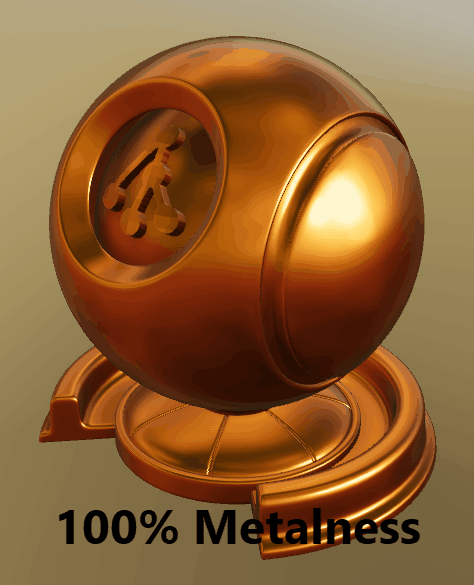
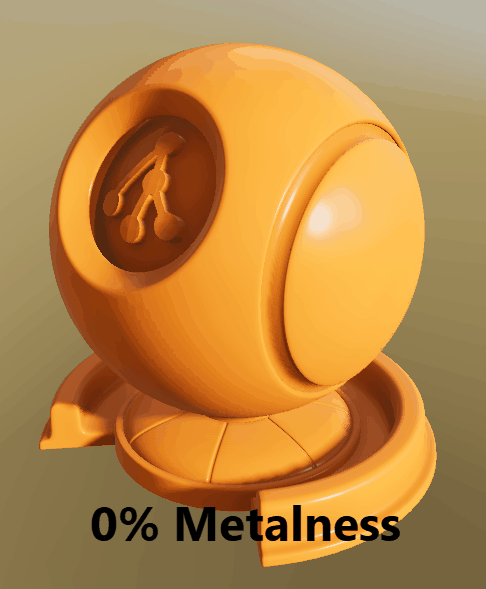
### **Metalness (Grayscale)**
All differences in reflectance and absorption of natural surfaces can be split into two different types: Electric (Metals) and Dielectric (Plastics, Fabric, etc.). The Metalness value defines the transition between these types. 0=Dielectric 100%=Metallic
### **Roughness (Grayscale)**
The Roughness channel describes how rough or smooth the surface is, which has a big influence on how it reflects the light and environment. 0%=smooth (like a mirror), 100% = full rough (like a paper)

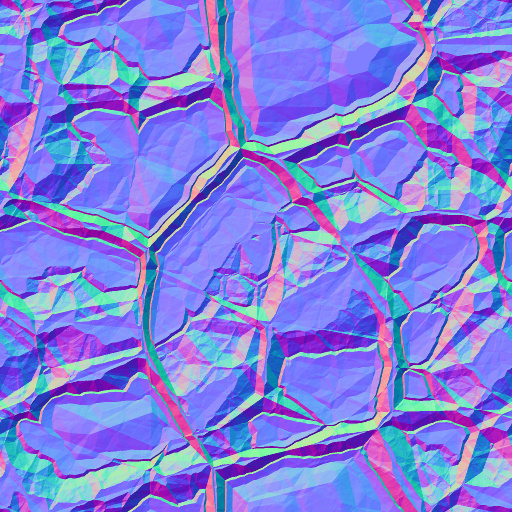
### **Normals (RGB)**
Normal Maps are used to add 3D details to the surface. These normal maps store a surface normal vector in tangent space. While Depence² uses a left-handed coordinate system it uses the following normal map orientation: Red=X+ Green=Y- Blue=Z+. Depence uses "DirectX-style" normal maps which are -Y:
### Example of a normal map.
#### **Height (Grayscale)**
In addition to Normal Mapping the Heights are used to create the 3D illusion of bigger high detailed structures. Therefore a grayscale image is used where Black = lowest height and White = Max Height


### **UV Mapping**
The UV-Mapping of a 3D Model defines how a texture will be applied on models polygons. These UV's are usually stored within the 3D-Model. In some cases, these won't be scaled correctly. Therefore each material has additional properties:
| UV Scale | Scales the texture on the model. |
| --------------- | ------------------------------------------------------------------------------------------------------------------ |
| UV Offset | Moves the texture on the model. |
| Texture Mapping |
UV Mapping: Uses default mapping.
Box-Mapping: Computes UVs in a Box perspective.
|
| Tile-Size | When using Box-Mapping this defines the size in square meters of one tile. |
| Animate UV | constantly moves the UV coordinates by the UV-offset values |
###
### Transparency
This option allows to make an object transparent or masked out by an alpha mask.
| Translucent | makes the object transparent \* |
| ------------------ | ------------------------------------------------------------- |
| Alpha Texture | Mask out an object based on a black/white texture |
| Alpha from Diffuse | Uses the alpha channel from the Diffuse texture for masking |
| Diffusion | Creates kind of milky glass effect depending on the roughness |
{% hint style="info" %}
The rendering of transparent objects is very limited in Depence. F.e. layering of multiple objects or things like absorption and shadows are not supported.
{% endhint %}
{% hint style="danger" %}
Once an object is rendered with transparency, the lighting calculations having a huge performance impact. This scales with the number of light & transparent objects. So only use transparency when really necessary and on few objects.
{% endhint %}
### **Weathering**
These properties create a procedural wetness effect on the surface.